
webapi 设置帮助页面隐藏或显示
1 设置口令 testV
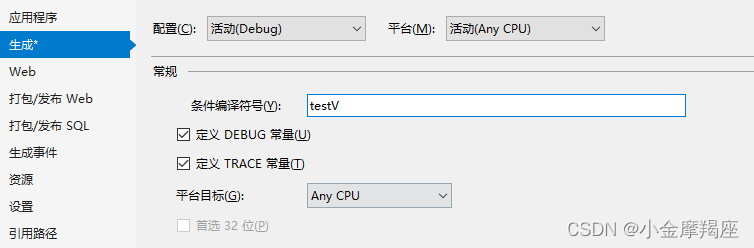
2 设置拦截器
public class CustomAuthorizeAttribute: AuthorizeAttribute
{
public override void OnAuthorization(AuthorizationContext filterContext)
{
//如果是在!testV条件下,则将一切请求(指的是应用了CustomAuthorize的控制器class或method)直接重定向到404页面;反之,执行默认行为
#if !testV
filterContext.Result = new RedirectResult("~/404.html");
#endif
}
}
3 将拦截器设置到帮助页面中
①在RegisterBundles中设定如下
public static void RegisterBundles(BundleCollection bundles)
{
#if testV
bundles.Add(new ScriptBundle("~/bundles/jquery").Include(
"~/Scripts/jquery-{version}.js"));
// 使用要用于开发和学习的 Modernizr 的开发版本。然后,当你做好
// 生产准备时,请使用 http://modernizr.com 上的生成工具来仅选择所需的测试。
bundles.Add(new ScriptBundle("~/bundles/modernizr").Include(
"~/Scripts/modernizr-*"));
bundles.Add(new ScriptBundle("~/bundles/bootstrap").Include(
"~/Scripts/bootstrap.js",
"~/Scripts/respond.js"));
bundles.Add(new StyleBundle("~/Content/css").Include(
"~/Content/bootstrap.css",
"~/Content/site.css"));
#endif
}
② 在HelpePage.controllers中设定拦截器
/// <summary>
/// The controller that will handle requests for the help page.
/// </summary>
[CustomAuthorizeAttribute]
public class HelpController : Controller
{
private const string ErrorViewName = "Error";
public HelpController()
: this(GlobalConfiguration.Configuration)
{
}

加入社区!打开量化的大门,首批课程上线啦!
更多推荐


 0
0 0
0- 0


 已为社区贡献1条内容

所有评论(0)