

最近有个项目,既要对接现有的webservice服务,又要对外提供soap协议的webservice接口,还要提供Restful API接口供自身的前端界面调用。
因为最近一直使用springboot框架,所以依然沿用该框架。
静态文件位于 /src/main/resources/static目录下,提示找不到静态文件的解决方法:新建文件夹:/src/main/webapp,再将static目录下的文件,都复制到webapp目录下。
直接上源码:
1、开发工具eclipse,先看一下项目结构:
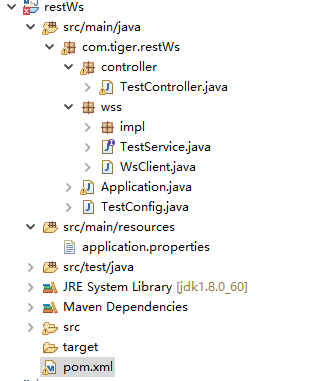
2、pom.xml:
<project xmlns="http://maven.apache.org/POM/4.0.0" xmlns:xsi="http://www.w3.org/2001/XMLSchema-instance"
  xsi:schemaLocation="http://maven.apache.org/POM/4.0.0 http://maven.apache.org/xsd/maven-4.0.0.xsd">
  <modelVersion>4.0.0</modelVersion>

  <groupId>com.tiger</groupId>
  <artifactId>restWs</artifactId>
  <version>0.0.1-SNAPSHOT</version>
  <packaging>jar</packaging>

  <name>restWs</name>
  <url>http://maven.apache.org</url>

	<properties>
	 	<maven.compiler.source>1.8</maven.compiler.source>
        <maven.compiler.target>1.8</maven.compiler.target>
		<project.build.sourceEncoding>UTF-8</project.build.sourceEncoding>
	</properties>

	<parent>
		<groupId>org.springframework.boot</groupId>
		<artifactId>spring-boot-starter-parent</artifactId>
		<version>1.5.11.RELEASE</version>
		<relativePath />
	</parent>

  <dependencies>

  		<dependency>
			<groupId>org.springframework.boot</groupId>
			<artifactId>spring-boot-starter</artifactId>
		</dependency>

		<dependency>
			<groupId>org.springframework.boot</groupId>
			<artifactId>spring-boot-starter-web</artifactId>
		</dependency>

     	<dependency>
            <groupId>org.apache.cxf</groupId>
            <artifactId>cxf-spring-boot-starter-jaxws</artifactId>
            <version>3.1.12</version>
        </dependency>

  </dependencies>

  <build>
		<plugins>
            <plugin>
				<groupId>org.springframework.boot</groupId>
				<artifactId>spring-boot-maven-plugin</artifactId>
				<configuration>
					<executable>true</executable>
				</configuration>
			</plugin>
			<plugin>
	            <groupId>org.apache.maven.plugins</groupId>
	            <artifactId>maven-compiler-plugin</artifactId>
	            <version>2.0.2</version>
	            <configuration>
	            	<encoding>utf-8</encoding>
	                <source>1.8</source>
	                <target>1.8</target>
	            </configuration>
	        </plugin>
		</plugins>

		<resources>
			<resource>
				<directory>src/main/resources</directory>
			</resource>
			<resource>
				<directory>src/main/java</directory>
				<includes>
					<include>**/*.xml</include>
				</includes>
			</resource>
		</resources>
  </build>

</project>
3、servlet配置类:TestConfig.java
package com.tiger.restWs;

import javax.xml.ws.Endpoint;
import org.apache.cxf.Bus;
import org.apache.cxf.bus.spring.SpringBus;
import org.apache.cxf.jaxws.EndpointImpl;
import org.apache.cxf.transport.servlet.CXFServlet;
import org.springframework.boot.web.servlet.ServletRegistrationBean;
import org.springframework.context.annotation.Bean;
import org.springframework.context.annotation.Configuration;
import org.springframework.web.context.support.AnnotationConfigWebApplicationContext;
import org.springframework.web.servlet.DispatcherServlet;
import com.tiger.restWs.wss.TestService;
import com.tiger.restWs.wss.impl.TestServiceImpl;

/**
 * @author wh
 * @date 2018年5月24日 上午11:52:42
*  @Description: servlet配置
 */
@Configuration
public class TestConfig {

     @Bean
     public ServletRegistrationBean dispatcherServlet() {
         return new ServletRegistrationBean(new CXFServlet(), "/ws/*");
     }

     /**
      * 添加普通的controller处理
     * @return
     */
     @Bean
     public ServletRegistrationBean dispatcherRestServlet() {
         AnnotationConfigWebApplicationContext context
                 = new AnnotationConfigWebApplicationContext();
         //替换成自己想买的controller包路径
         context.scan("com.tiger.restWs.controller");
         DispatcherServlet disp = new DispatcherServlet(context);
         ServletRegistrationBean registrationBean = new ServletRegistrationBean(disp);
         registrationBean.setLoadOnStartup(1);
         //映射路径自定义,必须设置一个不重复的名称
         registrationBean.addUrlMappings("/rest/*");
         registrationBean.setName("rest");
         return registrationBean;
     }

      @Bean(name = Bus.DEFAULT_BUS_ID)
      public SpringBus springBus() {
          return new SpringBus();
      }

      @Bean
      public TestService testService() {
          return new TestServiceImpl();
      }

      @Bean
      public Endpoint endpoint() {
          EndpointImpl endpoint = new EndpointImpl(springBus(), testService());
          endpoint.publish("/");
          return endpoint;
      }
}
3.1、springboot2.0.5的配置文件写法:
package com.tiger.restWs;

import org.apache.cxf.Bus;
import org.apache.cxf.bus.spring.SpringBus;
import org.apache.cxf.jaxws.EndpointImpl;
import org.springframework.context.annotation.Bean;
import org.springframework.context.annotation.Configuration;
import org.springframework.web.servlet.config.annotation.WebMvcConfigurer;
import com.tiger.restWs.wss.TestService;
import com.tiger.restWs.wss.impl.TestServiceImpl;


/**
 * @author wh
 * @date 2018年5月24日 上午11:52:42
*  @Description: servlet配置
 */
@Configuration
public class TestConfig implements  WebMvcConfigurer{

      @Bean(name = Bus.DEFAULT_BUS_ID)
      public SpringBus springBus() {
          return new SpringBus();
      }

      @Bean
      public TestService testService() {
          return new TestServiceImpl();
      }

      @Bean
      public EndpointImpl endpoint() {
          EndpointImpl endpoint = new EndpointImpl(springBus(), testService());
          endpoint.publish("/");
          return endpoint;
      }
}
4、启动类:Application.java
package com.tiger.restWs;

import org.springframework.boot.SpringApplication;
import org.springframework.boot.autoconfigure.SpringBootApplication;
import org.springframework.boot.web.servlet.ServletComponentScan;

@ServletComponentScan
@SpringBootApplication
public class Application {

	public static void main(String[] args) {
		SpringApplication.run(Application.class, args);
		System.out.println("*****************************");
		System.out.println("*******双协议服务启动成功**********");
		System.out.println("*****************************");
	}

}
5、Restful API:TestController.java
package com.tiger.restWs.controller;

import java.util.HashMap;
import java.util.Map;
import org.springframework.boot.autoconfigure.EnableAutoConfiguration;
import org.springframework.web.bind.annotation.RequestMapping;
import org.springframework.web.bind.annotation.RequestMethod;
import org.springframework.web.bind.annotation.RestController;

@RestController
@EnableAutoConfiguration
@RequestMapping("/")
public class TestController {

	 @RequestMapping(value="/test",method=RequestMethod.GET)
	 Map<String,Object> list() {
		 Map<String,Object> map = new HashMap<String,Object>();
		 map.put("func", "test");
		 map.put("name", "king");
		 return map;
	 }

}
6、webservice接口:TestService.java
package com.tiger.restWs.wss;

import javax.jws.WebMethod;
import javax.jws.WebParam;
import javax.jws.WebService;

@WebService
public interface TestService {

    @WebMethod
    String sayHi(@WebParam(name = "name") String name);

}
7、接口实现类:TestServiceImpl.java
package com.tiger.restWs.wss.impl;

import javax.jws.WebService;
import com.tiger.restWs.wss.TestService;

@WebService(targetNamespace="http://wss.restWs.tiger.com/",
endpointInterface = "com.tiger.restWs.wss.TestService")
public class TestServiceImpl implements TestService{

	public String sayHi(String name) {
		return "hello," + name;
	}

}
8、webservice客户端:WsClient.java
package com.tiger.restWs.wss;

import org.apache.cxf.jaxws.endpoint.dynamic.JaxWsDynamicClientFactory;
import org.springframework.scheduling.annotation.EnableScheduling;
import org.springframework.stereotype.Component;

@Component
@EnableScheduling
public class WsClient {

	  public static void main(String[] args) throws Exception{
		  try{
			  JaxWsDynamicClientFactory dcf =JaxWsDynamicClientFactory.newInstance();
			  org.apache.cxf.endpoint.Client c =dcf.createClient("http://localhost:8086/ws?wsdl");
			  Object[] objects=c.invoke("sayHi","wawa哇");
	          System.out.println("result="  + objects[0].toString());
	      }catch(Exception e){
			  e.printStackTrace();
		  }
	  }
}
9、属性配置文件:application.properties
server.port=8086
##springboot2时添加如下配置####
cxf.path=/ws
10、webservice测试地址:http://localhost:8086/ws?wsdl
11、Restful API调用地址:http://localhost:8086/rest/test






 已为社区贡献1条内容

所有评论(0)