
使用dgl库提示没有torchdata,No module named ‘torchdata.datapipes‘
·
解决这个问题需要关注三个版本,torch,dgl,torchdata
首先先去dgl官网看一下版本依赖:Deep Graph Library
# If you have installed dgl-cuXX package, please uninstall it first.
pip install dgl -f https://data.dgl.ai/wheels/torch-2.4/cu118/repo.html可以发现最高支持的torch是2.4x的版本,torch的版本迭代很快,如果高了,需要重新安装Pytorch,在Previous PyTorch Versions找到对应的版本进行重新安装torch。
# ROCM 6.1 (Linux only)
pip install torch==2.4.0 torchvision==0.19.0 torchaudio==2.4.0 --index-url https://download.pytorch.org/whl/rocm6.1
# CUDA 11.8
pip install torch==2.4.0 torchvision==0.19.0 torchaudio==2.4.0 --index-url https://download.pytorch.org/whl/cu118
# CUDA 12.1
pip install torch==2.4.0 torchvision==0.19.0 torchaudio==2.4.0 --index-url https://download.pytorch.org/whl/cu121
# CUDA 12.4
pip install torch==2.4.0 torchvision==0.19.0 torchaudio==2.4.0 --index-url https://download.pytorch.org/whl/cu124
# CPU only
pip install torch==2.4.0 torchvision==0.19.0 torchaudio==2.4.0 --index-url https://download.pytorch.org/whl/cpu然后进入torchdata官网,查看版本依赖,torchdata · PyPI
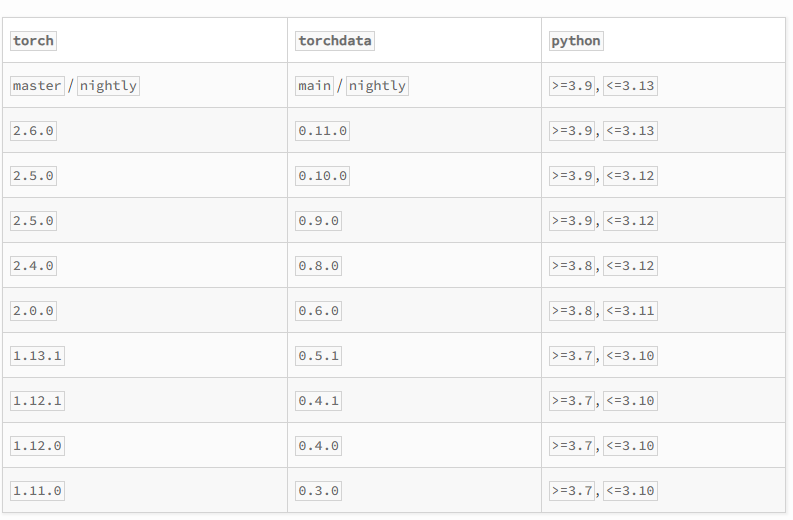
pip install torchdata==0.8.0根据dgl->确定torch版本为2.4x,再去确定torchdata的版本号为0.8.0。

加入社区!打开量化的大门,首批课程上线啦!
更多推荐

 11
11 0
0- 0


 已为社区贡献1条内容

所有评论(0)