
Cannot read property ‘state‘ of undefined var state
·
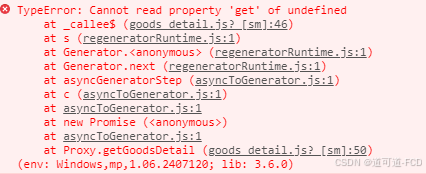
微信小程序开发出现“Cannot read property 'state' of undefined var state”的问题!!!
问题原因:
因为vue3中与vue2中配置vuex的方法是不一样的,所以按照老师视频里的方法会报错。
解决方法:
1.修改store.js文件
store.js文件
// import Vue from 'vue'
// import Vuex from 'vuex'

import {createStore} from 'vuex'
import moduleCart from '@/store/cart.js'

// Vue.use(Vuex)

const store = createStore({
  modules: {
    // 挂载购物车的 vuex 模块,模块内成员的访问路径被调整为 m_cart,例如:
    // 购物车模块中 cart 数组的访问路径是 m_cart/cart
    'm_cart': moduleCart
  }
})

export default store
2.修改main.js
main.js文件
// 导入网络请求的包
import { $http } from '@escook/request-miniprogram'
uni.$http = $http
// 请求的根路径
$http.baseUrl = 'https://www.uinav.com'
// #ifndef VUE3
import Vue from 'vue'
import App from './App'
import store from '@/store/store.js'

// 请求拦截器
$http.beforeRequest = function(options) {
  uni.showLoading({
    title: '数据加载中...'
  })
}

// 响应拦截器
$http.afterRequest = function() {
  uni.hideLoading()
}

// 封装弹框的方法
uni.$showMsg = function(title = '数据请求失败!', duration = 1500) {
  uni.showToast({
    title,
    duration,
    icon: 'none'
  })
}

Vue.config.productionTip = false
App.mpType = 'app'

const app = new Vue({
  ...App,
})
app.$mount()
// #endif

// #ifdef VUE3
import {createSSRApp} from 'vue'
import store from '@/store/store.js'
import App from './App'
export function createApp() {
  const app = createSSRApp(App)
  app.use(store)
  return {
    app
  }
}
// #endif
注意:
解决方法来自,原视频17.加入购物车 - 实现加入购物车的功能_哔哩哔哩_bilibili的评论区。
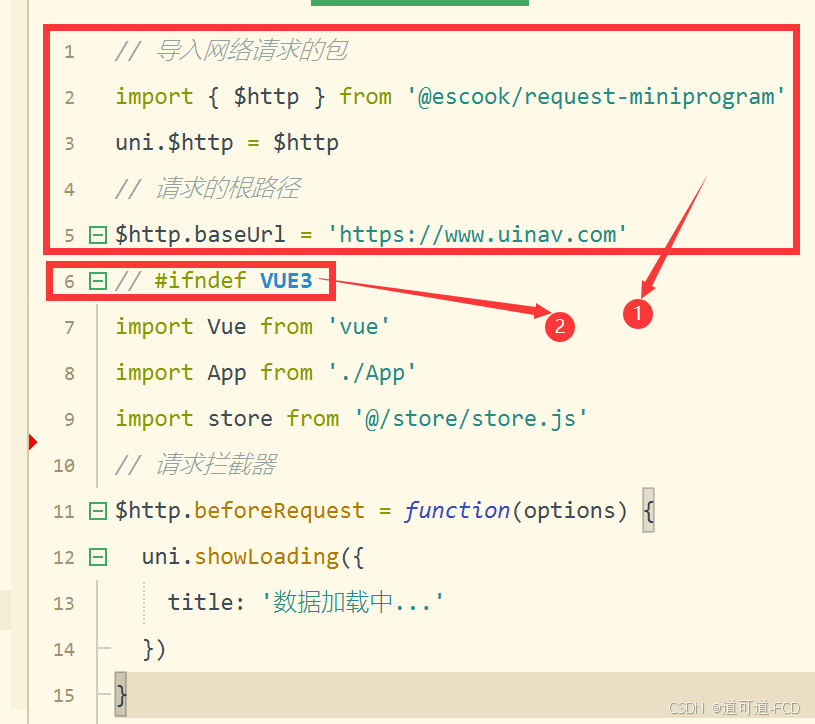
此处要把1放到2的外侧,不然会报错:

加入社区!打开量化的大门,首批课程上线啦!
更多推荐


 6
6 0
0- 0


 已为社区贡献1条内容

所有评论(0)