
爬虫:字体加密反爬的破解之道
本文介绍了字体反爬虫技术的原理与应对方法。字体加密通过自定义字体文件使网页内容对用户可见但对爬虫不可读,常见于电影票房、招聘网站等场景。文章详细讲解了字体文件处理流程:定位字体文件、解析字体映射关系、提取坐标信息,并提供Python实现方案。通过猫眼电影和实习僧两个实战案例,展示了如何利用fontTools库解析WOFF字体文件,结合OCR识别和坐标绘图技术还原加密数据,最终成功突破字体反爬获取目
·
学习目标:
- 了解字体反爬原理
- 熟悉字体解析过程
- 熟悉坐标字体绘图
一、字体加密原理
简而言之,前端技术可以通过特定手段实现页面内容对正常用户可见,但通过爬虫抓取时无法获取有效数据。
在 CSS3 之前,网页开发者只能依赖用户本地已安装的字体。如今,借助 @font-face 规则,开发者可以将自定义字体文件部署在服务器上,并通过 CSS 引入。当用户通过浏览器访问页面时,字体文件会被自动下载到本地并使用,从而实现更一致的排版效果。
值得注意的是,即便使用 Selenium 这类自动化工具,也可能无法正确提取经过前端干扰处理的内容。
二、字体文件处理方式
1.字体加密特点
- 实例:https://www.shixiseng.com/interns?keyword=%E4%BA%92%E8%81%94%E7%BD%91IT&city=%E5%85%A8%E5%9B%BD&type=intern&from=menu
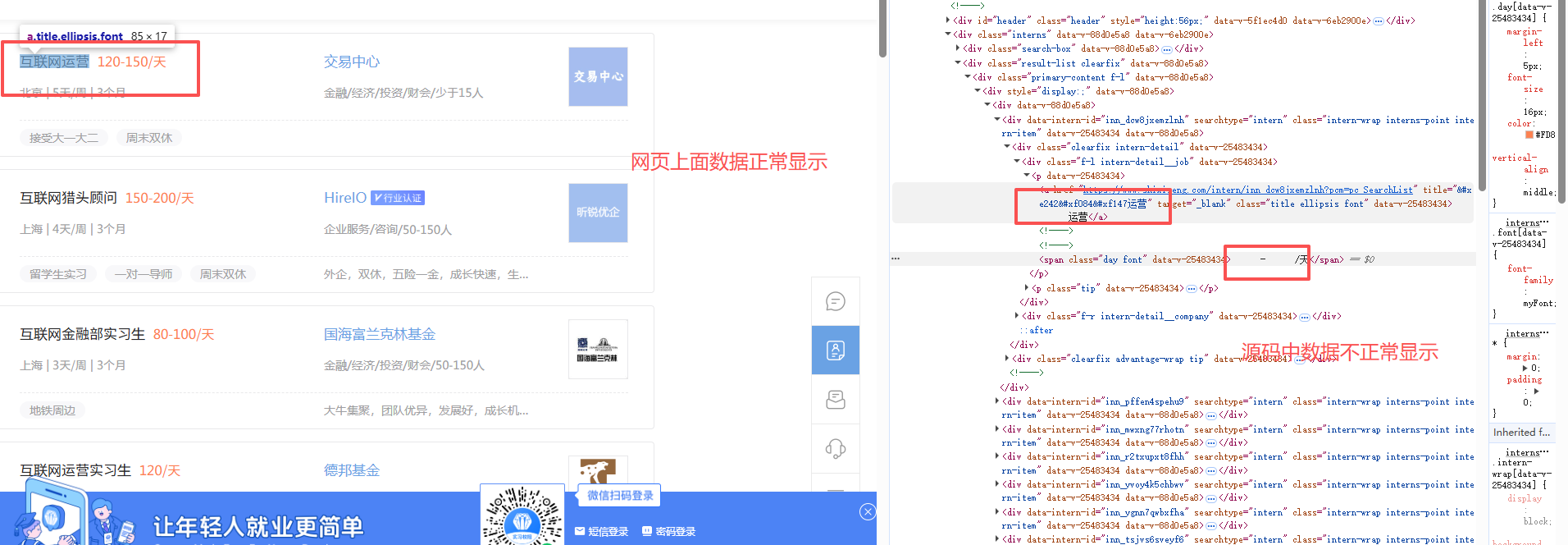
- 字体加密的特点
- 在网页上显示正常,在源码里面看到的是乱码或者是问号
2.定位字体位置
- 字体加密会有个映射的字体文件
- 可以在元素面板搜索 @font-face 会通过这个标签指定字体文件,可以直接在页面上搜索,找到它字体的网址
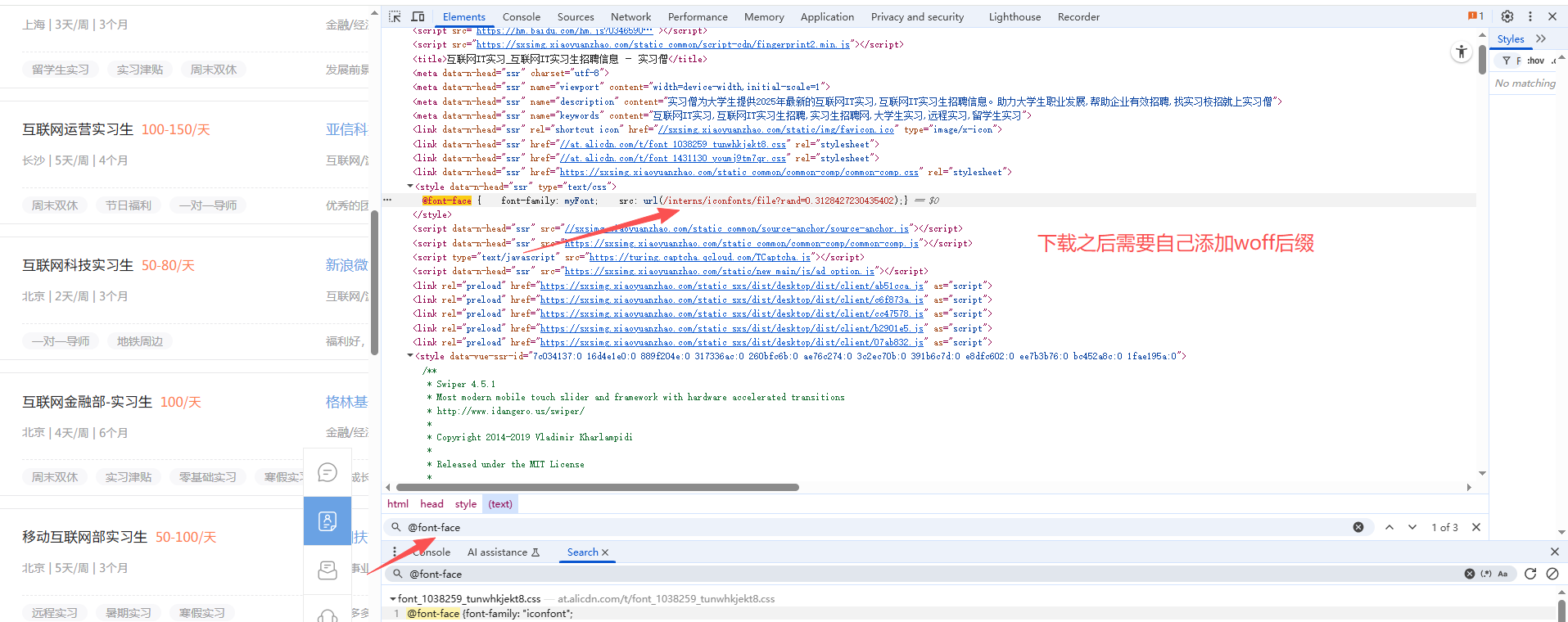
- 可以直接把字体文件下载下来,文件一般需要自己修改后缀(网页的字体后缀一般选用woff)
- TTF:Windows 操作系统的标准字体格式,也被 macOS 用作系统字体之一。
- OTF:开放的字体格式,支持 Unicode 字符集,跨平台兼容性强。
- FON:Windows 95 及更早版本采用的字体格式。
- TTC:字体集合文件,可包含多个字体,支持批量安装。
- SHX:CAD 系统中常用的字体格式,符合 CAD 文字规范,不支持中文等亚洲语言。
- EOT:早期用于网页嵌入的字体格式,现已逐渐被淘汰。
- WOFF:主流的网页字体格式,也可转换为 TTF 供桌面应用程序使用。
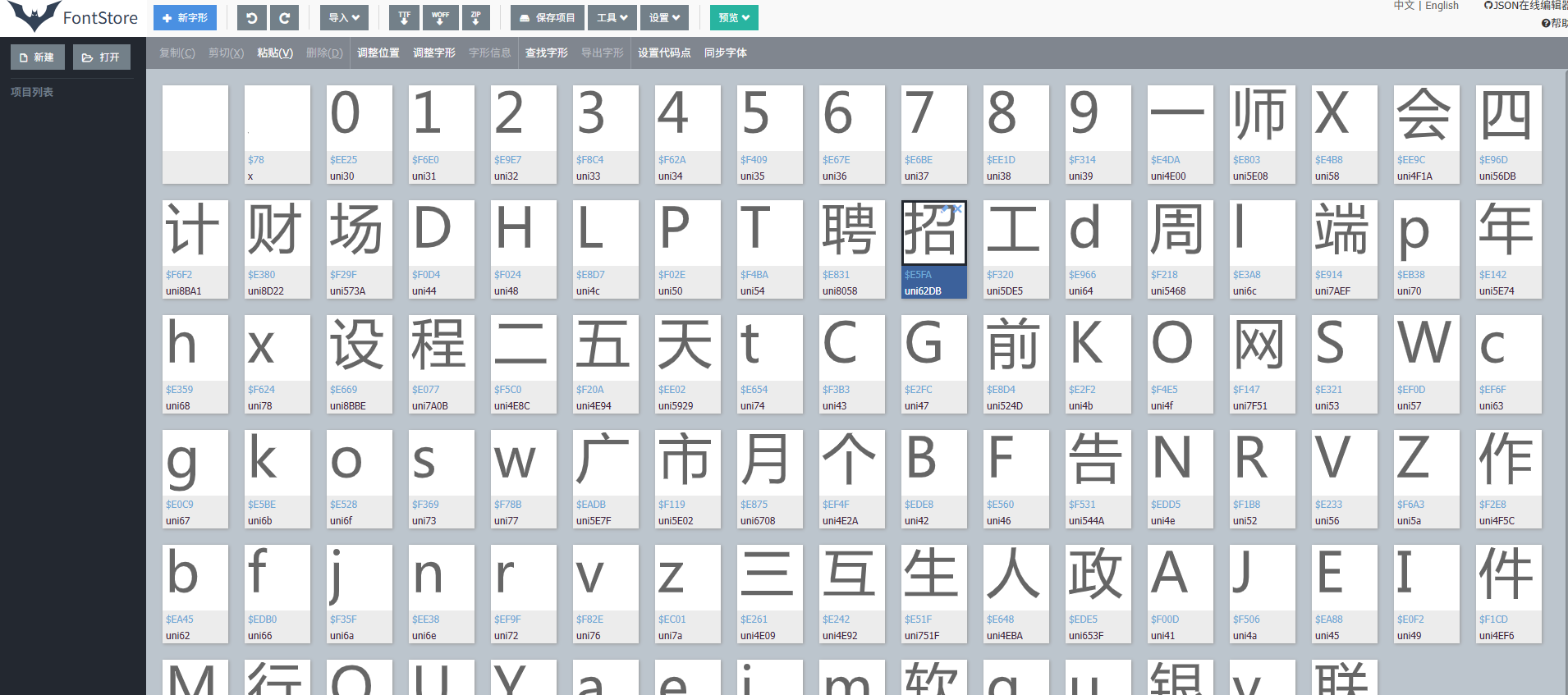
- 查看字体文件
- 在线字体解析网站:https://font.qqe2.com/
- 直接把文件拖动到在线网址即可
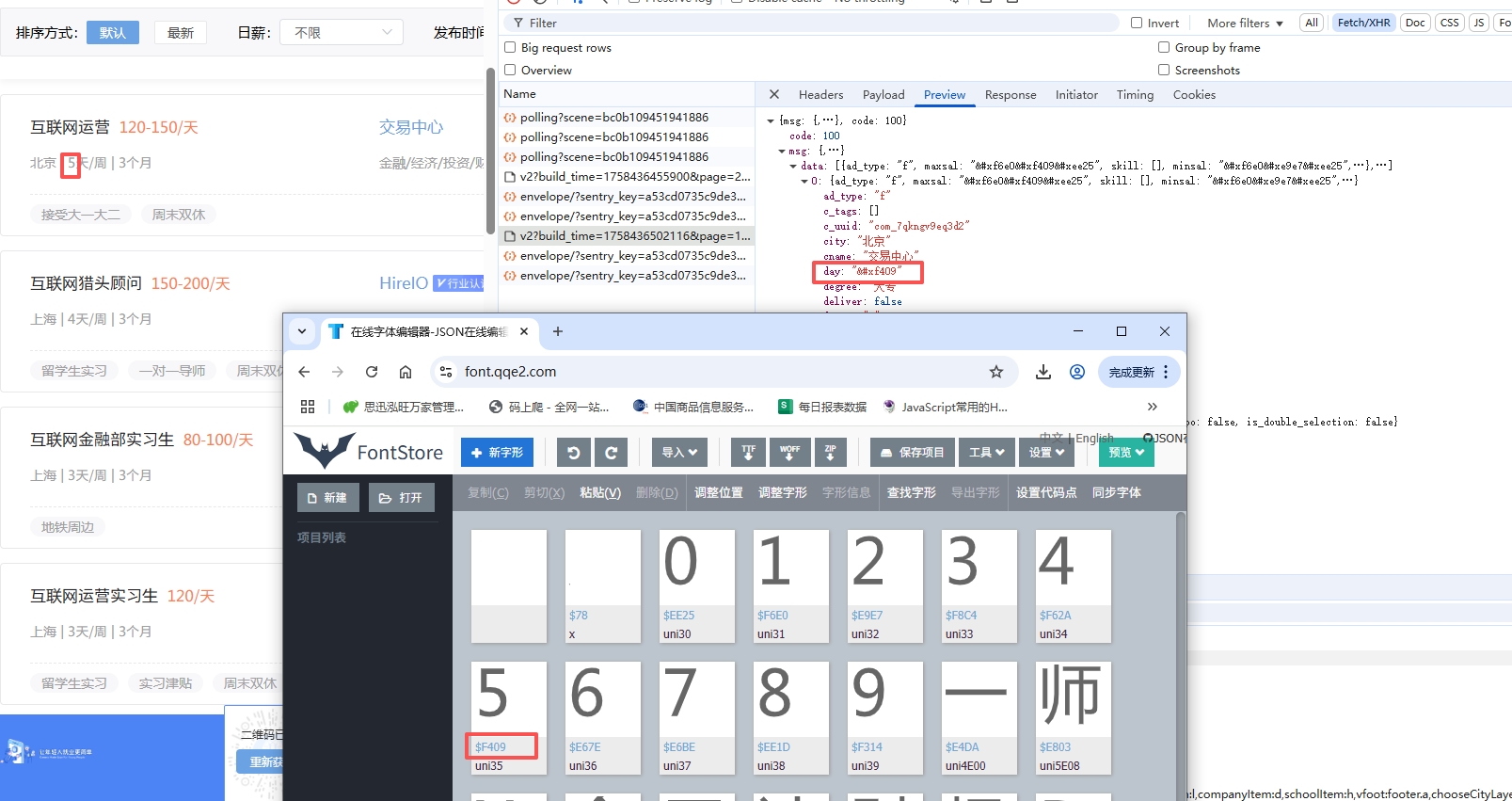
3.找文件与网页对应的关系
三、python处理字体
1.工具库
pip install fontTools 2.字体读取
from fontTools.ttLib import TTFont
# 加载字体文件
font=TTFont('file.woff')
# 转为xml文件:可以用来查看字体的字形轮廓、字符映射、元数据等字体相关的信息
font.saveXML('file.xml')
3.字体读取
from fontTools.ttLib import TTFont
# 加载字体文件
font=TTFont('file.woff')
kv=font.keys()
print(kv)
字体文件不仅包含字形数据和点信息,还包括字符到字形映射、字体标题、命名和水平指标等,这些信息存放在对应的表中:
| 表 | 作用 |
|---|---|
| cmap | 字符到字形映射 |
| glyf | 字形数据 |
| head | 字体标题 |
| hhea | 水平标题 |
| hmtx | 水平指标 |
| loca | 索引到位置 |
| maxp | 最大限度的 |
| name | 命名 |
| post | 后记 |
4.获取请求到的字体code和name的对应关系
code_name_map=font_aa.getBestCmap()5.获取字体坐标信息
font_aa=TTFont('file.woff')
# 获取请求到的字体形状
glyf=font_aa['glyf']
# font['glyf'][字体编码].coordinates
font_aa['glyf']['uni4E94'].coordinates
四、项目实战
案例一:
1.采集目标
项目目标: 采集猫眼电影(https://piaofang.maoyan.com/dashboard/movie)的实时票房数据。
当前进展: 已成功破解网站的数字反爬虫机制(字体反爬),能够正确解析页面上被特殊字体渲染的票房数字。
待解决问题: 目前无法直接获取数据接口,其核心请求参数存在加密,逆向分析尚未完成。
2.代码实现
字体处理代码:
import matplotlib

matplotlib.use('TkAgg')  # 或 'Qt5Agg',具体取决于安装的支持包

import ddddocr
import matplotlib.pyplot as plt
import os
import logging
from fontTools.ttLib import TTFont
from lxml import etree

# 配置日志
logging.basicConfig(level=logging.INFO, format='%(asctime)s - %(levelname)s - %(message)s')
logger = logging.getLogger(__name__)


class TTFont_parse():
    def __init__(self, woff):
        # 确保图片目录存在
        if not os.path.exists("图片"):
            os.makedirs("图片")

        self.font = TTFont(woff)
        self.font.saveXML('file1.xml')
        # 初始化OCR,避免重复创建实例
        try:
            self.ocr = ddddocr.DdddOcr(show_ad=False)
        except TypeError:
            self.ocr = ddddocr.DdddOcr()

    def paint(self, xy_list, TTGlyph_name):
        """绘制字形并保存为图片"""
        try:
            plt.figure(figsize=(1, 1), dpi=100)  # 使用更小的画布,避免识别问题

            # 遍历每个图案
            for shape in xy_list:
                # 提取 x 和 y 坐标
                x, y = zip(*[(int(point[0]), int(point[1])) for point in shape])

                # 绘制多边形
                plt.plot(x, y, 'k-', linewidth=2)  # 使用黑色实线,更清晰
                plt.fill(x, y, 'k', alpha=0.8)  # 填充黑色,更清晰

            plt.xticks([])
            plt.yticks([])
            plt.axis('equal')
            plt.axis('off')  # 隐藏坐标轴
            plt.tight_layout(pad=0)  # 去除边距

            # 保存图片
            img_path = f"图片/{TTGlyph_name[0]}.png"
            plt.savefig(img_path, bbox_inches='tight', pad_inches=0)
            plt.close()
            return img_path
        except Exception as e:
            logger.error(f"绘制图片失败 {TTGlyph_name}: {str(e)}")
            return None

    def pic_ocr(self, img_path):
        """识别图片中的字符"""
        try:
            with open(img_path, 'rb') as f:
                image = f.read()

            result = self.ocr.classification(image)
            # 处理可能的识别结果
            return result
            # if result == "D":
            #     return "0"
            # # 检查是否是数字
            # if result.isdigit():
            #     return result
            # else:
            #     logger.warning(f"识别结果不是数字: {result}")
            #     return None
        except Exception as e:
            logger.error(f"OCR识别失败: {str(e)}")
            return None

    def parse_font(self, tt):
        """解析字体XML并返回键值对"""
        try:
            if tt.xpath('./contour[1]'):
                xy_list = []
                TTGlyph_name = tt.xpath('./@name')
                if not TTGlyph_name:
                    return None, None

                contour_list = tt.xpath('./contour')
                for contour in contour_list:
                    TTGlyph_xy = [(x, y) for x, y in zip(contour.xpath('./pt/@x'), contour.xpath('./pt/@y'))]
                    if TTGlyph_xy:  # 确保有坐标点
                        TTGlyph_xy.append(TTGlyph_xy[0])  # 闭合图形
                        xy_list.append(TTGlyph_xy)

                if xy_list:  # 确保有图形数据
                    img_path = self.paint(xy_list, TTGlyph_name)
                    if img_path:
                        res = self.pic_ocr(img_path)
                        return (TTGlyph_name[0], res)
                return (TTGlyph_name[0], None)
            return None, None
        except Exception as e:
            logger.error(f"解析字体失败: {str(e)}")
            return None, None

    def main(self):
        """主函数,返回字体映射字典"""
        ziti = {}
        try:
            # 读取并解析XML数据
            with open('file1.xml', 'r', encoding='utf-8') as f:
                xml_data = f.read().encode('utf-8')

            root = etree.fromstring(xml_data)
            TTGlyph_list = root.xpath('//glyf/TTGlyph')

            # 遍历每个字形
            for tt in TTGlyph_list[1:-1]:
                key, value = self.parse_font(tt)
                if key and value is not None:
                    try:
                        ziti[key] = value

                    except Exception as e:
                        logger.warning(f"{e}")
            return ziti
        except Exception as e:
            logger.error(f"主程序执行失败: {str(e)}")
            return ziti


if __name__ == '__main__':
    try:
        zt = TTFont_parse('猫眼.woff')
        result = zt.main()
        print("字体解析结果:", result)
    except Exception as e:
        logger.critical(f"程序运行失败: {str(e)}", exc_info=True)
解析代码:
import requests
import re
from 字体处理 import TTFont_parse
import csv
import os

class MaoYan():
    def __init__(self):
        self.headers = {
            "Referer": "https://piaofang.maoyan.com/dashboard/movie",
            "User-Agent": "Mozilla/5.0 (Windows NT 10.0; Win64; x64) AppleWebKit/537.36 (KHTML, like Gecko) Chrome/137.0.0.0 Safari/537.36",
            "X-FOR-WITH": "C528iR7eMSbhlph0PEo31QFAx3Lznzw5K0WrZOFKkuHHa+Xc5kUOhdNNANrquNAIqga0GL2zZvtmJgmL9HW9FNY/ibundTT+30l06skLo3YSUyfsTwEY4ToLhhBwjreIwYw2uVDrMN/3PlVA2xF9sJKjz+Av1Rhmqr0wDSdJMnkXL5IF6x7kpJuPhZIzMcgTVwVPzNCeEkCPbvvilXJ9JA==",
        }
        self.cookies = {
            "_lxsdk_cuid": "1996f721166c8-0a7dc6667778148-26011e51-1fa400-1996f72116660",
            "_lxsdk": "1996f721166c8-0a7dc6667778148-26011e51-1fa400-1996f72116660",
            "_lx_utm": "utm_source%3Dbing%26utm_medium%3Dorganic"
        }
        self.url = "https://piaofang.maoyan.com/dashboard-ajax/movie"
        self.filename = 'maoyan_data.csv'

    def get_json(self):
        params = {
            "orderType": "0",
            "uuid": "1996f721166c8-0a7dc6667778148-26011e51-1fa400-1996f72116660",
            "timeStamp": "1758596470548",
            "User-Agent": "TW96aWxsYS81LjAgKFdpbmRvd3MgTlQgMTAuMDsgV2luNjQ7IHg2NCkgQXBwbGVXZWJLaXQvNTM3LjM2IChLSFRNTCwgbGlrZSBHZWNrbykgQ2hyb21lLzEzNy4wLjAuMCBTYWZhcmkvNTM3LjM2",
            "index": "263",
            "channelId": "40009",
            "sVersion": "2",
            "signKey": "0d476af44d4352b26810d1f2b15b05a7",
            "WuKongReady": "h5"
        }
        response = requests.get(self.url, headers=self.headers, cookies=self.cookies, params=params)
        return response.json()

    """获取加密数据与实际数据的映射"""
    def decrypt_data(self,json_data):
        font_url ='http:'+ re.findall(r',url\("([^"]+?\.woff)"\)', json_data["fontStyle"])[0]
        with open('猫眼.woff','wb')as f:
            f.write(requests.get(font_url).content)
        zt=TTFont_parse('猫眼.woff')
        result = zt.main()
        return result

    """解析数据"""
    def parse_data(self,json_data):
        result=self.decrypt_data(json_data)
        item=dict()
        for i in json_data['movieList']['list']:
            # 电影名称
            item['电影名称']=i['movieInfo']['movieName']
            item['上映时间']=i['movieInfo']['releaseInfo']+' '+i['sumBoxDesc']

            boxSplitUnit_list=[]
            for x in i['boxSplitUnit']['num'].split(';')[:-1]:
                aa=x.upper().replace('&#X', 'uni')
                if '.' in aa:
                    aa=aa.replace('.','')
                    boxSplitUnit_list.append(result[aa])
                else:
                    boxSplitUnit_list.append(result[aa])
            boxSplitUnit=str(float(''.join(boxSplitUnit_list))/100)+'万'
            item['综合票房']=boxSplitUnit

            item['票房占比']=i['boxRate']
            item['排片场次']=i['showCount']
            item['排片占比']=i['showCountRate']
            item['场均人次']=i['avgShowView']
            item['上座率']=i['avgSeatView']
            self.save(item)


    """保存数据"""
    def save(self, item_dict):
        header = ['电影名称', '上映时间', '综合票房', '票房占比', '排片场次', '排片占比','场均人次','上座率']
        file_exists = os.path.exists(self.filename)
        with open('maoyan_data.csv', 'a', encoding='utf-8', newline='') as f:
            f_csv = csv.DictWriter(f, fieldnames=header)
            if not file_exists:
                f_csv.writeheader()
            f_csv.writerow(item_dict)
            print(f'{item_dict['电影名称']}---保存成功')


    def main(self):
        json_data=self.get_json()
        self.parse_data(json_data)


if __name__ == '__main__':
    my=MaoYan()
    my.main()
案例二:
1.采集目标
2.代码实现
获取了字体链接之后,复制到浏览器中下载字体文件,然后保存到代码所在的文件夹中
import requests
import re
from fontTools.ttLib import TTFont
import json
import os
import csv


class ShiXiSeng():
    def __init__(self):
        self.headers = {
            "referer": "https://www.shixiseng.com/interns?keyword=%E6%95%B0%E6%8D%AE%E5%88%86%E6%9E%90&city=%E5%85%A8%E5%9B%BD&type=intern",
            "user-agent": "Mozilla/5.0 (Windows NT 10.0; Win64; x64) AppleWebKit/537.36 (KHTML, like Gecko) Chrome/137.0.0.0 Safari/537.36"
        }
        self.cookies = {
            "__jsluid_s": "dec45cde197d9fc07c1f285d7088fe4b",
            "utm_source_first": "sem-bing-B-pc-100_001_%25E5%2593%2581%25E7%2589%258C%25E8%25AF%258D_6.16-%25E5%25AE%259E%25E4%25B9%25A0%25E5%2583%25A7%25E3%2580%2591-%25E5%25AE%259E%25E4%25B9%25A0%25E5%2583%25A7",
            "utm_source": "sem-bing-B-pc-100_001_%25E5%2593%2581%25E7%2589%258C%25E8%25AF%258D_6.16-%25E5%25AE%259E%25E4%25B9%25A0%25E5%2583%25A7%25E3%2580%2591-%25E5%25AE%259E%25E4%25B9%25A0%25E5%2583%25A7",
            "utm_campaign": "hr",
            "adClose": "true",
            "Hm_lvt_03465902f492a43ee3eb3543d81eba55": "1758426823,1758613202",
            "HMACCOUNT": "66294A5300752703",
            "adCloseOpen": "true",
            "position": "pc_search_syss",
            "Hm_lpvt_03465902f492a43ee3eb3543d81eba55": "1758613220"
        }
        self.url = "https://www.shixiseng.com/app/interns/search/v2"
        self.html_url = "https://www.shixiseng.com/interns"
        self.filename='sxs.csv'

    def get_json(self,page):
        params = {
            "build_time": "1758613230943",
            "page": str(page),
            "type": "intern",
            "keyword": "数据分析",
            "area": "",
            "months": "",
            "days": "",
            "degree": "",
            "official": "",
            "enterprise": "",
            "salary": "-0",
            "publishTime": "",
            "sortType": "",
            "city": "全国",
            "internExtend": ""
        }

        # # 字体链接的获取
        # html_res=requests.get(self.html_url,headers=self.headers, cookies=self.cookies, params=params).text
        # font_url='https://www.shixiseng.com'+re.findall(r'@font-face \{    font-family: myFont;    src: url\((.*?)\);',html_res)[0]
        # font_url=font_url.split('?')[0]
        # print(font_url)
        # # 保存字体文件
        # with open('实习僧.woff','wb')as f:
        #     f.write(requests.get(font_url).content)

        response = requests.get(self.url, headers=self.headers, cookies=self.cookies, params=params)
        return response.json()

    def decrypt_font(self):
        font = TTFont('实习僧.woff')
        font.saveXML('实习僧.xml')

        f = open('实习僧.xml', 'r', encoding='utf-8')
        file_data = f.read()
        f.close()

        # 字符到字形的映射
        x = re.findall('<map code="(.*?)" name="(.*?)"/>', file_data)
        print(x)

        # 提取字形ID映射
        glyph = re.findall('<GlyphID id="(.*?)" name="(.*?)"/>', file_data)
        glyph_dict = {}
        for j in glyph:
            glyph_dict[f'{j[1]}'] = j[0]
        print(glyph_dict)

        # 定义字符映射表
        str_data = '0123456789一师x会四计财场DHLPT聘招工d周L端p年hx设程二五天tXG前KO网SWcgkosw广市月个BF告NRVZ作bfjnrvz三互生人政AJEI件M行QUYaeim软qu银y联'
        str_list = [' ', ''] + [i for i in str_data]
        print(str_list)

        x_dict = {}
        for i in x:
            x_dict[f'&#{i[0].strip("0")}'] = str_list[int(glyph_dict[i[1]])]
        print(x_dict)
        return x_dict

    def parse_json(self, json_data, x_dict):
        print('--' * 100)
        for i in json_data['msg']['data']:
            item = {}
            item['职位'] = i['name'].split('&')[0]  # 清理编码
            item['工作城市'] = i['city']
            item['实习时间'] = x_dict[i['month_num']] + '个月'
            item['education_requirement'] = i['degree']
            item['公司名称'] = i['cname']
            item['industry'] = i['industry']
            item['min_salary'] = ''.join([x_dict['&' + i] for i in i['minsal'].split('&')[1:]]) + '元/天'
            item['max_salary'] = ''.join([x_dict['&' + i] for i in i['maxsal'].split('&')[1:]]) + '元/天'
            item['福利'] = i['c_tags']
            item['职位标签'] = i['i_tags']
            self.save(item)

    """保存数据"""
    def save(self, item_dict):
        header = ['职位', '工作城市', '实习时间', 'education_requirement', '公司名称', 'industry', 'min_salary', 'max_salary','福利','职位标签']
        file_exists = os.path.exists(self.filename)
        with open('sxs.csv', 'a', encoding='utf-8', newline='') as f:
            f_csv = csv.DictWriter(f, fieldnames=header)
            if not file_exists:
                f_csv.writeheader()
            f_csv.writerow(item_dict)


    def main(self):
        for page in range(1,5):
            print(f'正在爬取第{page}页')
            json_data = self.get_json(page)
            x_dict = self.decrypt_font()
            self.parse_json(json_data, x_dict)
            print(f'第{page}保存成功')


if __name__ == '__main__':
    sxs = ShiXiSeng()
    sxs.main()

加入社区!打开量化的大门,首批课程上线啦!
更多推荐

 15
15 0
0- 0


 已为社区贡献1条内容

所有评论(0)