
使用Java通过get请求获取api.open-meteo.com网站的天气数据
·
使用Java通过get请求获取api.open-meteo.com网站的天气数据
继C++中使用cpp-httplib和nlohmann_json库实现http请求获取天气数据和Nodejs通过get请求获取api.open-meteo.com网站的天气数据,我们再使用Java实现对应功能。
以下是使用 Java 发送 HTTP GET 请求以获取天气数据的示例代码:
示例代码
import java.io.BufferedReader;
import java.io.InputStreamReader;
import java.net.HttpURLConnection;
import java.net.URI;
import java.net.URL;
public class GetWeatherData {
public static void main(String[] args) {
try {
// API URL
String apiUrl = "http://api.open-meteo.com/v1/forecast?latitude=37.8136&longitude=144.9631¤t_weather=true";
// 创建 URL 对象
// Java ‘URL(java. lang. String)‘ 自版本 20 起已弃用
// https://blog.csdn.net/WithCYwind/article/details/145185245
// URL url = new URL(apiUrl);
// 首先创建 URI 对象
URI uri = new URI(apiUrl);
// 再通过 toURL() 转换为 URL
URL url = uri.toURL();
// 打开 HTTP 连接
HttpURLConnection connection = (HttpURLConnection) url.openConnection();
// 设置请求方法为 GET
connection.setRequestMethod("GET");
// 获取响应代码
int responseCode = connection.getResponseCode();
System.out.println("HTTP response code: " + responseCode);
// 如果响应成功(状态码 200)
if (responseCode == HttpURLConnection.HTTP_OK) {
// 读取响应数据
BufferedReader in = new BufferedReader(new InputStreamReader(connection.getInputStream()));
StringBuffer response = new StringBuffer();
String line;
while ((line = in.readLine()) != null) {
response.append(line);
}
// 关闭输入流
in.close();
// 打印响应数据
System.out.println("Weather Data:");
System.out.println(response.toString());
} else {
System.out.println("GET request failed.");
}
// 断开连接
connection.disconnect();
} catch (Exception exception) {
exception.printStackTrace();
}
}
}
说明
-
API URL:
- 使用
http://api.open-meteo.com/v1/forecast获取天气数据。 - 查询参数包括纬度 (
latitude)、经度 (longitude) 和当前天气 (current_weather=true)。
- 使用
-
HttpURLConnection:
- 用于发送 HTTP 请求和接收响应。
- 设置请求方法为
GET。
-
响应处理:
- 如果响应代码为
200(HTTP_OK),读取并打印响应数据。 - 使用
BufferedReader逐行读取响应内容。
- 如果响应代码为
-
错误处理:
- 捕获异常并打印堆栈跟踪。
运行代码
-
保存文件
将代码保存为GetWeatherData.java。 -
编译代码
在终端中运行:javac GetWeatherData.java -
运行程序
运行生成的.class文件:java GetWeatherData
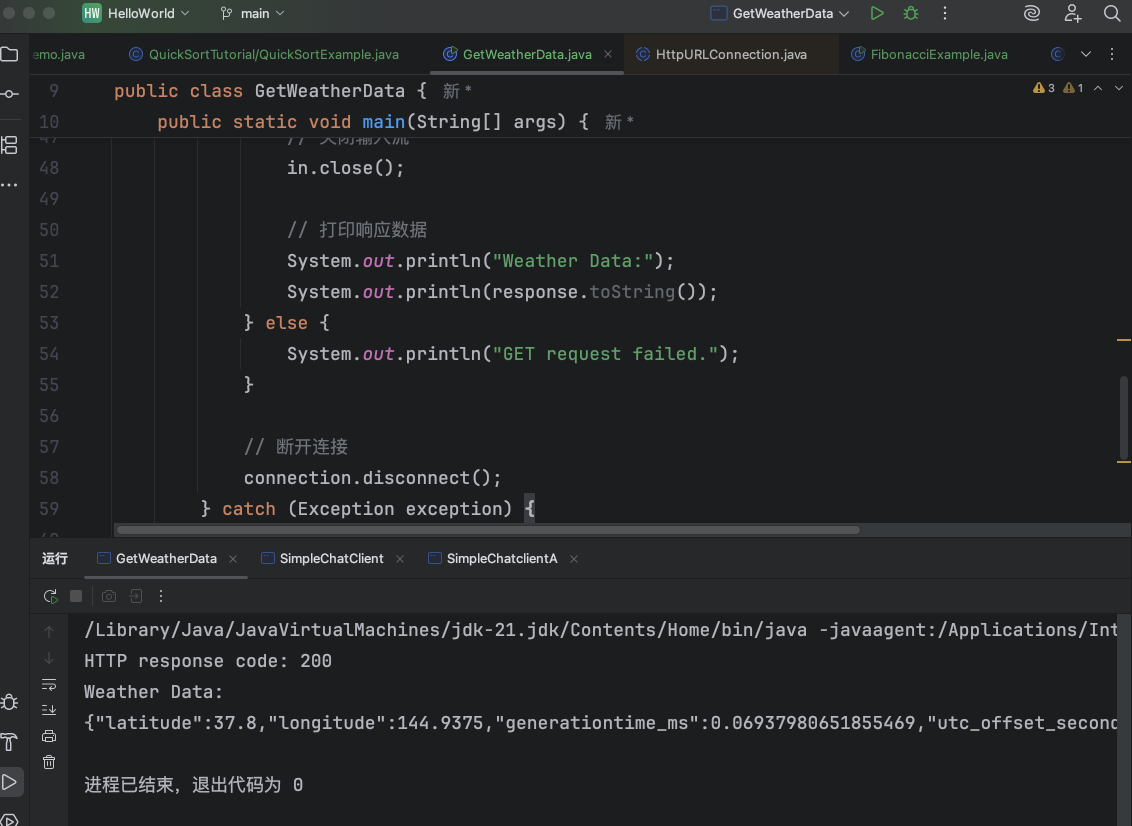
示例输出
HTTP response code: 200
Weather Data:
{"latitude":37.8,"longitude":144.9375,"generationtime_ms":0.06937980651855469,"utc_offset_seconds":0,"timezone":"GMT","timezone_abbreviation":"GMT","elevation":0.0,"current_weather_units":{"time":"iso8601","interval":"seconds","temperature":"°C","windspeed":"km/h","winddirection":"°","is_day":"","weathercode":"wmo code"},"current_weather":{"time":"2025-11-01T13:00","interval":900,"temperature":19.3,"windspeed":34.7,"winddirection":285,"is_day":0,"weathercode":0}}
注意事项
- 确保你的网络可以访问
http://api.open-meteo.com。 - 如果需要发送 POST 请求,可以使用
connection.setRequestMethod("POST")并写入请求体。 - 如果需要解析 JSON 响应,可以使用第三方库(如 Jackson 或 Gson)。
参考资料

加入社区!打开量化的大门,首批课程上线啦!
更多推荐



 4
4 0
0- 0


 已为社区贡献1条内容

所有评论(0)