
08爬虫:实战抓取北京新发地菜价信息
首先给出我自己编写的代码。接下来我们逐步分析如何完成上述的爬虫代码。
·
import requests
import parsel
from math import ceil
import csv
import time

file = open('菜价.csv',mode='w',encoding='utf-8')
csvwriter = csv.writer(file)

main_url = 'http://www.xinfadi.com.cn/priceDetail.html'
response = requests.get(main_url)
response.encoding = 'utf-8'
selector = parsel.Selector(response.text)
hrefs = selector.xpath('//ul[@id="sort1"]/li/a/@href').getall()

# 发送post请求的方法
def post_xinfadi(url,current,prodPcatid):
    # url = 'http://www.xinfadi.com.cn/getPriceData.html'
    time.sleep(5)
    data = {
        'limit': 20,
        'current': f'{current}',  # 改变这个参数值可以实现分业抓取
        'pubDateStartTime': '2024/11/11',  # 修改这里的时间可以实现不同日期的菜价
        'pubDateEndTime': '2024/11/11',
        'prodPcatid': f'{prodPcatid}',  # 修改prodPcatid能够实现不同产品种类价格的抓取
        'prodCatid': '',
        'prodName': ''
    }
    response = requests.post(url=url, data=data)
    response.encoding = 'utf-8'
    return response

for href in hrefs:
    prodPcatid = href.split('(')[-1].strip(')')
    url = 'http://www.xinfadi.com.cn/getPriceData.html'
    response = post_xinfadi(url=url,current=1,prodPcatid=prodPcatid) #调用post_xinfadi函数请求url
    count = ceil(response.json()['count'] / 20) # 返回值是int类型
    for current in range(1,count+1):
        print(f'正在抓取{prodPcatid}的第{current}页内容')
        response = post_xinfadi(url=url,current=current,prodPcatid=prodPcatid)
        print(response.json())
        list = response.json()['list']
        for lis in list:
            prodName = lis['prodName']
            lowPrice = lis['lowPrice']
            highPrice = lis['highPrice']
            avgPrice = lis['avgPrice']
            csvwriter.writerow([prodName, lowPrice, highPrice, avgPrice])
            print(prodName, lowPrice, highPrice, avgPrice)
    time.sleep(3)
    # break
file.close()
response.close()
首先给出我自己编写的代码。接下来我们逐步分析如何完成上述的爬虫代码。
网页结构分析
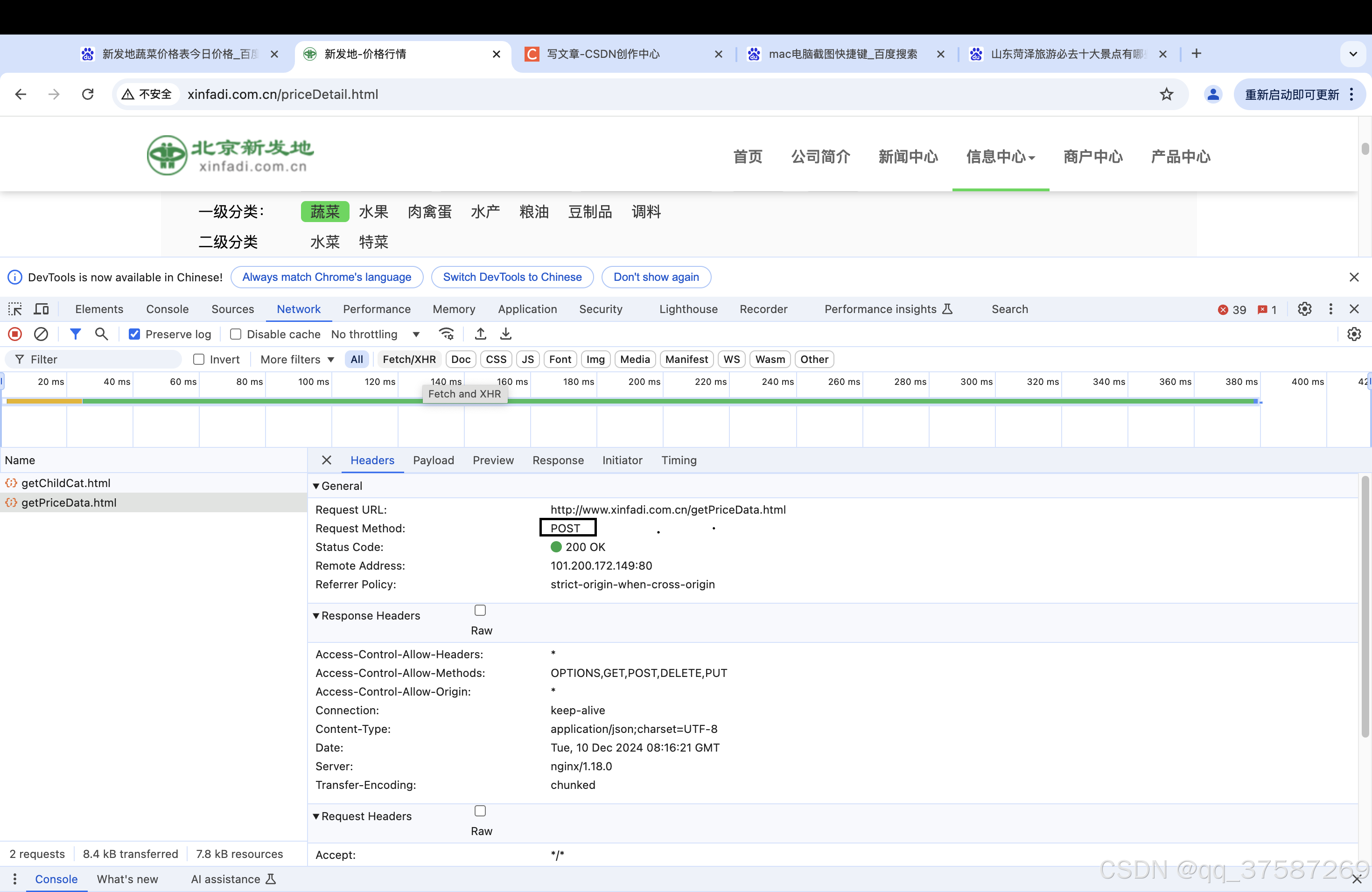
通过抓包可以发现该请求是post请求,通过Payload可以找到post请求对应的参数。
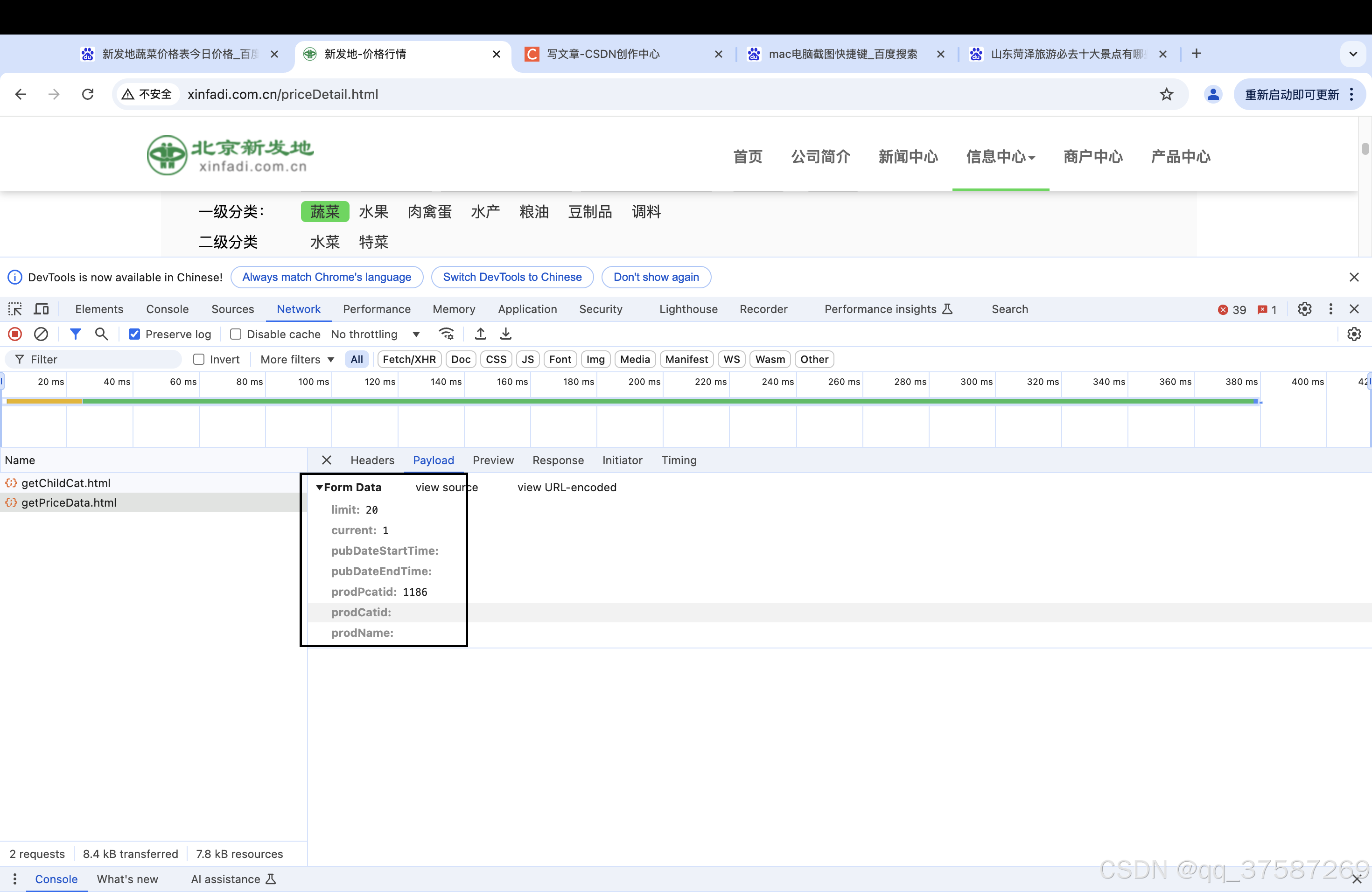 limit表示每页显示的数量。
current表示当前是第几页,current取值为1表示当前是第一页。
prodPcatid表示产品种类。
pubDateStartTime:开始时间。
pubDateEndTime:结束时间。
产品的种类可以在网页的代码中找到,如下图所示。
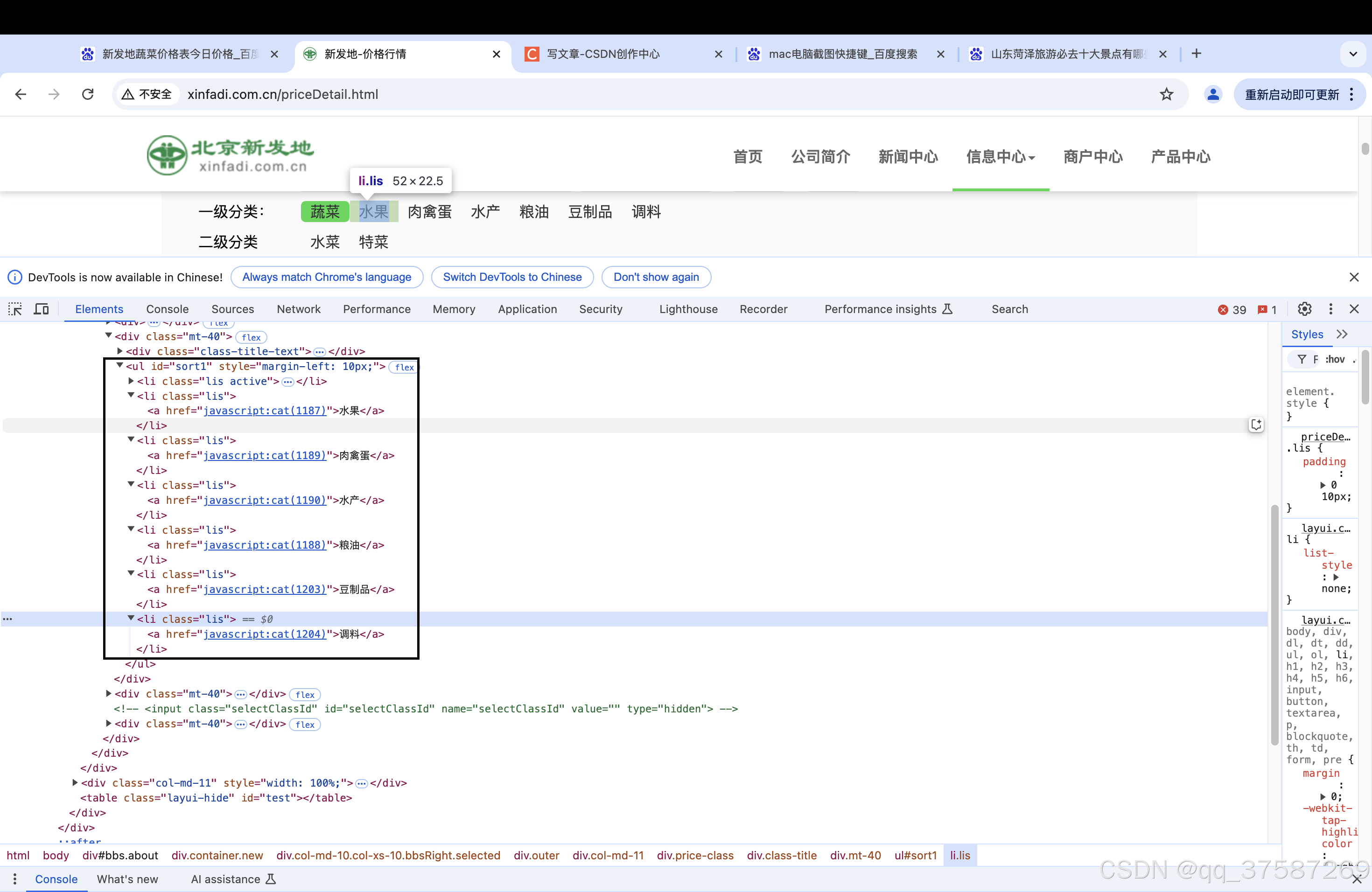
获取产品的prodPcatid
因此我们首先要做的是通过爬虫获取各个产品的prodPcatid。对应的代码如下。
main_url = 'http://www.xinfadi.com.cn/priceDetail.html'
response = requests.get(main_url)
response.encoding = 'utf-8'
selector = parsel.Selector(response.text)
hrefs = selector.xpath('//ul[@id="sort1"]/li/a/@href').getall()

for href in hrefs:
    prodPcatid = href.split('(')[-1].strip(')')
这样我们就可以得到每一个产品的prodPcatid。接下来就是发送post请求,获取蔬菜的价格信息。
获取蔬菜价格信息
我们定义一个函数用于专门用于爬取当前网页的数据信息的方法,返回response对象。
# 发送post请求的方法
def post_xinfadi(url,current,prodPcatid):
    # url = 'http://www.xinfadi.com.cn/getPriceData.html'
    time.sleep(5)
    data = {
        'limit': 20,
        'current': f'{current}',  # 改变这个参数值可以实现分业抓取
        'pubDateStartTime': '2024/11/11',  # 修改这里的时间可以实现不同日期的菜价
        'pubDateEndTime': '2024/11/11',
        'prodPcatid': f'{prodPcatid}',  # 修改prodPcatid能够实现不同产品种类价格的抓取
        'prodCatid': '',
        'prodName': ''
    }
    response = requests.post(url=url, data=data)
    response.encoding = 'utf-8'
    return response
接下来就是解析网页,获取蔬菜价格信息。
list = response.json()['list']
for lis in list:
    prodName = lis['prodName']
    lowPrice = lis['lowPrice']
    highPrice = lis['highPrice']
    avgPrice = lis['avgPrice']
翻页信息抓取
通过以上的分析能够完成一页数据的抓取,接下来我们要实现翻页数据的抓取。在开头,我们说到,current表示当前是第几页。因此通过修改current值就能够实现翻页抓取。
count = ceil(response.json()['count'] / 20) # 返回值是int类型
for current in range(1,count+1):
    print(f'正在抓取{prodPcatid}的第{current}页内容')
    response = post_xinfadi(url=url,current=current,prodPcatid=prodPcatid)
    print(response.json())
    list = response.json()['list']
    for lis in list:
        prodName = lis['prodName']
        lowPrice = lis['lowPrice']
        highPrice = lis['highPrice']
        avgPrice = lis['avgPrice']
        print(prodName, lowPrice, highPrice, avgPrice)
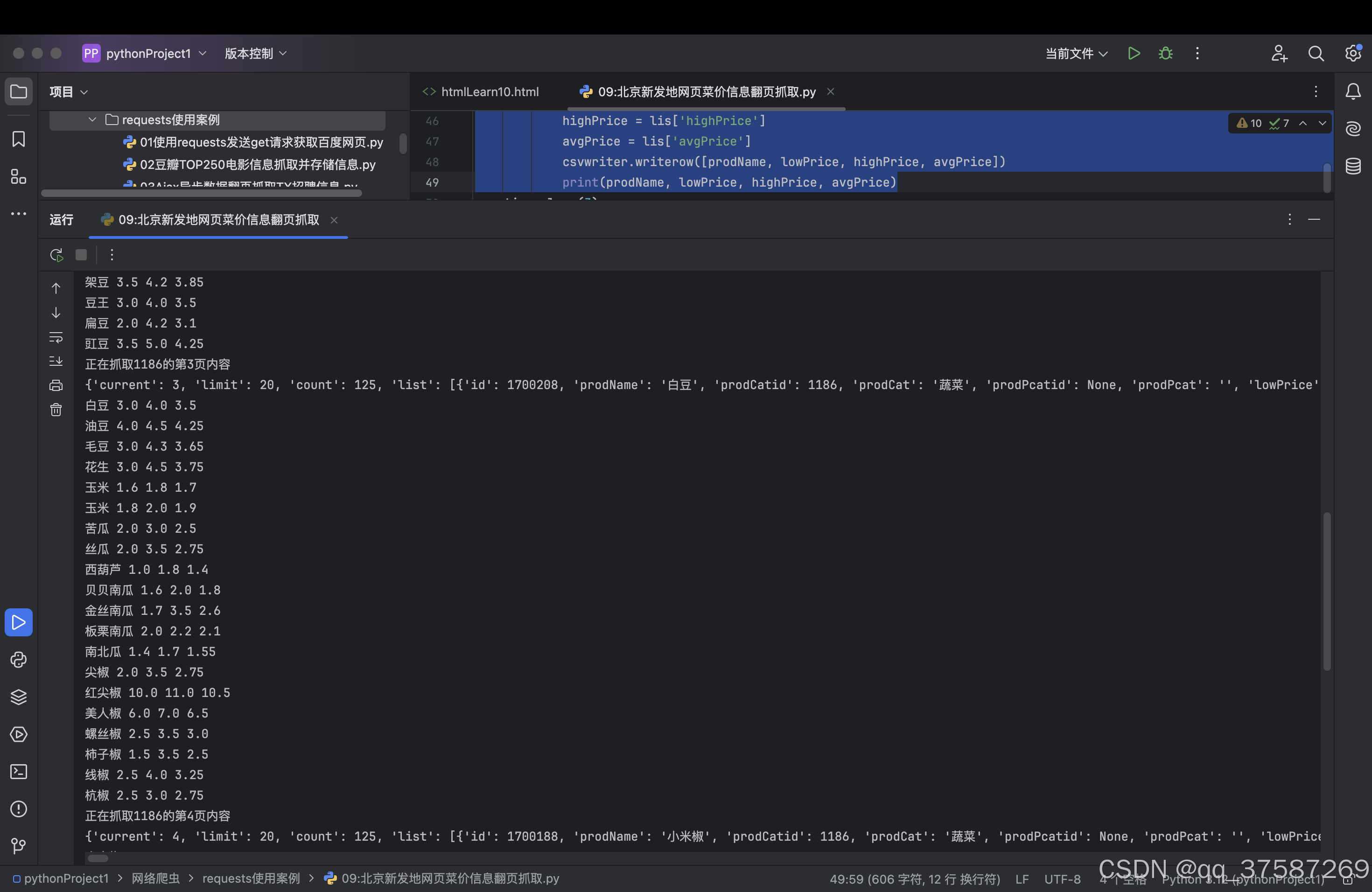
运行程序,pycharm的运行界面会打印出如下的信息。
写入CSV文件中
蔬菜价格爬取完毕之后,我们可以将获取的信息保存在CSV文件中,方便以后分析使用。通过一下代码即可完成数据信息写入CSV中。
file = open('菜价.csv',mode='w',encoding='utf-8')
csvwriter = csv.writer(file)

csvwriter.writerow(写入的信息,需要以列表的形式写入)

加入社区!打开量化的大门,首批课程上线啦!
更多推荐

 12
12 0
0- 0


 已为社区贡献1条内容

所有评论(0)